What Is Solscan? A Guide to Solana Blockchain Explorer
Key takeaways
Solscan is a free blockchain explorer built for the Solana network
You can use Solscan to track transactions, monitor wallets, and analyze tokens and NFTs
Solscan helps with on-chain analysis, but does not allow trading or transfers
Transaction data from Solscan can be useful for crypto tax reporting
Tools like Blockstats complement Solscan by turning raw blockchain data into tax-ready reports and portfolio insights
Solscan is a blockchain explorer designed specifically for the Solana ecosystem. It allows anyone to view public blockchain data such as wallet balances, transaction history, token transfers, NFT activity, and network statistics.
What is Solscan?
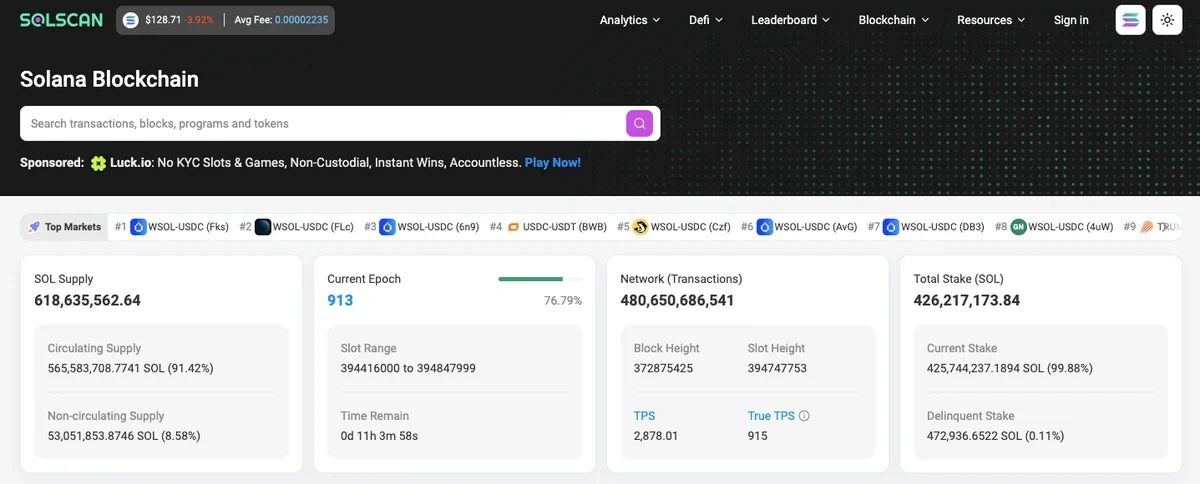
Solscan is a free blockchain explorer for the Solana network. This guide covers everything you need to know about how to use Solscan. If you've wanted to check what's happening on the Solana blockchain, Solscan makes it simple. You can find token holders, see how much SOL a wallet contains, check NFT floor prices, or verify transaction details.
Solscan is like a search engine for Solana. Copy any wallet address, transaction ID, or token name you want to explore. Solscan will show you the relevant information in an easy-to-understand interface. To get started with your portfolio tracking, you can follow our guide on how to connect Solana transactions to Blockstats.
How to use Solscan?
Solscan helps you understand blockchain activity through three main functions. Let's walk through each one.
Transaction tracking
Check all the details related to specific transactions on Solana. You can see whether your transaction was confirmed, how much you paid in fees, and the exact timestamp of when it happened. This information is especially useful during tax season when you need to report your crypto activity.
Wallet monitoring
Keep track of any Solana wallet's complete data, including current balance, token holdings, and full transaction history. You can monitor your own wallets to track your portfolio or watch other wallets to understand market movements.
Token analysis
View data on any Solana-based token, including recent trading volume, price changes, and holder distribution. You can see what percentage of tokens are owned by large holders (whales) and track how tokens are distributed across the network.
Want to avoid spending hours with spreadsheets? Start automated per-wallet tracking with Blockstats and track your crypto portfolio seamlessly
How to look up wallet address on Solscan
Here's how you can look up any wallet address on Solscan.
-
Copy the Wallet Address: Grab the wallet address you want to check. If you're looking at your own wallet, you can find the address in your wallet's browser extension or mobile app.
-
Visit Solscan: Go to solscan.io and paste the wallet address into the search bar at the top of the page.
-
View basic details: The top section shows the wallet's total SOL balance and how many different tokens it currently holds.
-
View additional details: Scroll down to see the complete transaction history, DeFi activities, NFT holdings, and staking accounts associated with the wallet.
How to look up transactions on Solscan website
Let's walk through how you can find and check transactions on Solscan.
-
Obtain the Transaction ID: Find your transaction signature in your cryptocurrency wallet. Wallets like Phantom give you a direct link to view the transaction on Solscan. If your wallet doesn't have this option, simply copy the transaction signature.
-
Use the search bar: Paste the transaction signature into the Solscan search bar.
-
View Details: You'll see all transaction details, including the wallets involved, timestamp, fees paid, and the final status of the transaction.
What transaction details does Solscan show?
Each Solana transaction page includes detailed information, such as:
-
Signature: The unique identifier for each transaction. This works like a receipt number for your blockchain activity.
-
Block: Every Solana transaction gets verified as part of a block. This field shows which block number your transaction was included in.
-
Timestamp: Shows the exact date and time when the transaction was processed on the blockchain.
-
Status: Tells you whether the transaction was successful, failed, or is still pending.
-
Signer: The wallet address that initiated and signed the transaction.
-
Fee: The cost you paid for the transaction to be processed on the network.
-
Actions: Activities that happened during the transaction, such as token swaps or smart contract interactions.
-
Balance Changes: Shows how token balances changed for each wallet involved in the transaction.
How to use Solscan for on-chain analysis
Solscan doesn't let you make trades or transactions directly. However, you can use it as a research tool to understand market trends and make better trading decisions.
Here are some ways to use Solscan for on-chain analysis:
Track your own activity:
Monitor your wallets and transactions to see what strategies worked and which ones didn't. Keep detailed records for your taxes.
Watch whale movements:
Solscan lets you track wallets that hold large amounts of SOL or other Solana tokens. When whales buy or sell, it can signal important market movements.
Analyze market sentiment:
Watch how SOL flows into and out of exchanges. Large inflows to exchanges often signal that holders are preparing to sell, while outflows suggest they're moving tokens to cold storage for long-term holding.
Study token distribution:
Check how many wallets hold a specific token and whether the distribution is concentrated among a few large holders or spread across many smaller ones.
Check out: Free crypto profit calculator →
What can I do with Solscan?
Solscan supports a wide range of research tasks on Solana. These include checking token information, token, and NFTs research, etc
How to look up token information on Solscan
Here's how you can research tokens on Solscan.
-
Search your token: Enter the token name or symbol in the Solscan search bar. Click on the correct token from the results. Solscan only shows tokens on the Solana blockchain. You won't find tokens from Ethereum or other networks here!
-
View Token Information: The top of the page displays basic information like current price, market cap, and total supply.
-
View analytics: Scroll down to see detailed data, including recent transactions, the biggest token holders, and complete distribution statistics across all wallets.
How to use Solscan for token deep dives
When you're researching a new token, Solscan helps you find important information:
-
Check holder distribution: See how many wallets hold the token and what percentage the top holders own. If just a few wallets control most of the supply, that's a red flag.
-
Track recent activity: Look at recent transactions to see if the token is actively traded or sitting dormant.
-
Verify smart contracts: Check the token's program address to verify it matches what the project claims.
-
Monitor price history: While Solscan shows current prices, you can see transaction volumes over time to understand trading activity.
How to research NFTs on Solscan
Solscan offers support for NFT research, but the features are somewhat basic.
What works:
-
Check floor prices and trading volume on the NFT dashboard
-
See who owns specific NFTs
-
Access mint details and metadata for individual NFTs
-
View transaction history for NFT collections
What doesn't work:
-
The search function can be tricky for finding NFT collections by name
-
Analytics are limited, it only show volume, active wallets, and floor price
-
No rarity rankings or trait analysis
If you need detailed NFT analytics, you might want to check out platforms specifically built for NFT research, like Magic Eden or HowRare.
What can I see on Solana analytic dashboards?
Solscan offers analytics dashboards to help you understand network-wide activity. Let's walk through the information available on these dashboards.
Network Performance:
This dashboard displays performance metrics for the Solana blockchain like transactions per second, total transactions processed, and the number of active wallets on the network.
Fee Tracker:
This dashboard shows average transaction fees on Solana and how much you'd need to pay for priority processing during high-traffic periods.
NFT Dashboard:
View statistics for NFTs on Solana, including total trading volume, trending collections, and floor prices for popular NFT projects.
DeFi Dashboard:
Check statistics for decentralized finance protocols on Solana, such as active users, total value locked, and trading volumes across different platforms.
Check out: Free crypto tax calculator →
What are the top Solscan alternatives?
Let's walk through other blockchain explorers you can use for Solana.
-
Official Solana Explorer: The Solana Explorer lets you track blockchain data like wallet addresses and transactions. While it's built by the team behind Solana, the interface isn't as beginner-friendly as Solscan and lacks some advanced features.
-
Solana.FM: Another Solana blockchain explorer with a clean user interface. While it's not as widely used as Solscan or Solana.FM offers good analytics and easy navigation.
-
Solana Beach: This blockchain explorer provides detailed analytics with a user-friendly design. It's particularly good for tracking validator performance and network statistics.
-
XRAY: A newer explorer focused on providing detailed transaction breakdowns and wallet analytics. Good for advanced users who want granular data.
Solscan remains the most popular choice for beginner investors because of its intuitive design and comprehensive features.
Can I use Solscan for crypto taxes?
Solscan can be helpful when you're preparing your crypto taxes. To file your crypto taxes correctly, you'll need this information from each transaction:
-
Date and time of each transaction
-
The type of cryptocurrency involved
-
Value of your crypto when you acquired it and when you disposed of it
-
Any fees you paid for the transaction
Solscan provides all of this transaction data from Solana, which you can use to calculate your capital gains and losses. But Blockstats automatically tracks all transactions from multiple blockchains and exchanges, calculates your gains and losses, and generates complete tax reports in minutes.
Use a Solana portfolio tracker for multiple wallets and exchanges
If you made many transactions across multiple wallets and exchanges during the year, manually gathering data from Solscan can take hours or even days.
Crypto tax software like Blockstats can automatically pull all your transactions from the Solana blockchain and exchanges like Coinbase, Binance, or Kraken. Blockstats calculates your gains, losses, and income, then generates a complete tax report in minutes.
Instead of manually copying data from Solscan for hundreds of transactions, you can connect your wallets and exchanges to Blockstats and get your tax forms ready to file.
Sign up for Blockstats today and get your Solana portfolio organized. Your taxes will thank you!
Frequently asked questions
Is Solscan free and safe to use?
Yes, Solscan is completely free to use. It's a read-only blockchain explorer, so you're not connecting your wallet or signing transactions. You're simply viewing public blockchain data that's already available on the Solana network.
What is Solscan and how to use it?
Solscan is a blockchain explorer for Solana. To use it, visit solscan.io and paste any wallet address, transaction ID, or token name into the search bar. Solscan will show you detailed information about your search query.
What is Solscan used for?
Solscan is used to track transactions, monitor wallet balances, analyze token holdings, research NFTs, and gather data for crypto tax reporting. Traders use it to research tokens and watch whale activity on the Solana network.
Can I track specific token transactions on Solscan?
Yes, you can track any token transaction on Solana using Solscan. Search for the transaction signature or navigate to a specific token page to see all recent transactions involving that token.
Do I need a wallet to use Solscan?
No, you don't need a wallet to use Solscan. It's a blockchain explorer that shows public data. You only need a wallet if you want to look up your own wallet address or transaction history.
Can I track DeFi activity on Solscan?
Yes, Solscan shows DeFi activity, including token swaps, liquidity pool interactions, and lending protocol transactions. You can see these activities in the transaction details and on individual wallet pages under the DeFi tab.